


Introduction
Most comparison lists for queue management systems pad their numbers with enterprise hardware vendors that cost tens of thousands of dollars and take months to deploy. None of that is relevant if you run a restaurant, a barbershop, or a hotel front desk.
If you run a walk-in business and you want to stop losing customers to disorganised queues, this guide is for you. We evaluated 9 tools built for real service businesses, comparing them on what actually matters: how customers check in, how staff get notified, what it costs at scale, and how long it takes to go live.
Research from Mordor Intelligence puts the global queue management market at $43.67 billion in 2026, growing at 12% annually. The growth is driven by cloud-native, mobile-first tools that require no hardware investment. That's the category this guide covers.
Queue management systems compared: at a glance
We evaluated 9 tools across five criteria. Pricing reflects annual billing where available.
| System | Best for | Starting price | Visit caps | |
| WaitQ | Walk-in first businesses | $27/mo | Yes | No |
| Waitwhile | Walk-ins + appointments | $31/mo | No | Yes - capped at 250 or 500 visits/month depending on plan |
| Waitlist Me | Small single-location businesses | $35/mo per location | No | No |
| NextMe | Restaurants, US market | $49.99/mo | No | No |
| Qwaiting | Multi-branch businesses | $199/mo | No | No |
| Waitly | Restaurants, US market | $49/mo | No | Yes - capped at 1,000 or 3,000 visits/month depending on plan |
| Carbonara | Restaurants, cafes, bars | Free | Yes | Yes - capped at 100 in Starter and only unlimited in the highest plan |
| Qminder | Enterprise service centres | ~$429/mo | No | No |
| QLess | Government, healthcare enterprise | Custom | No | Not published |
The 9 best queue management systems in 2026
1. WaitQ
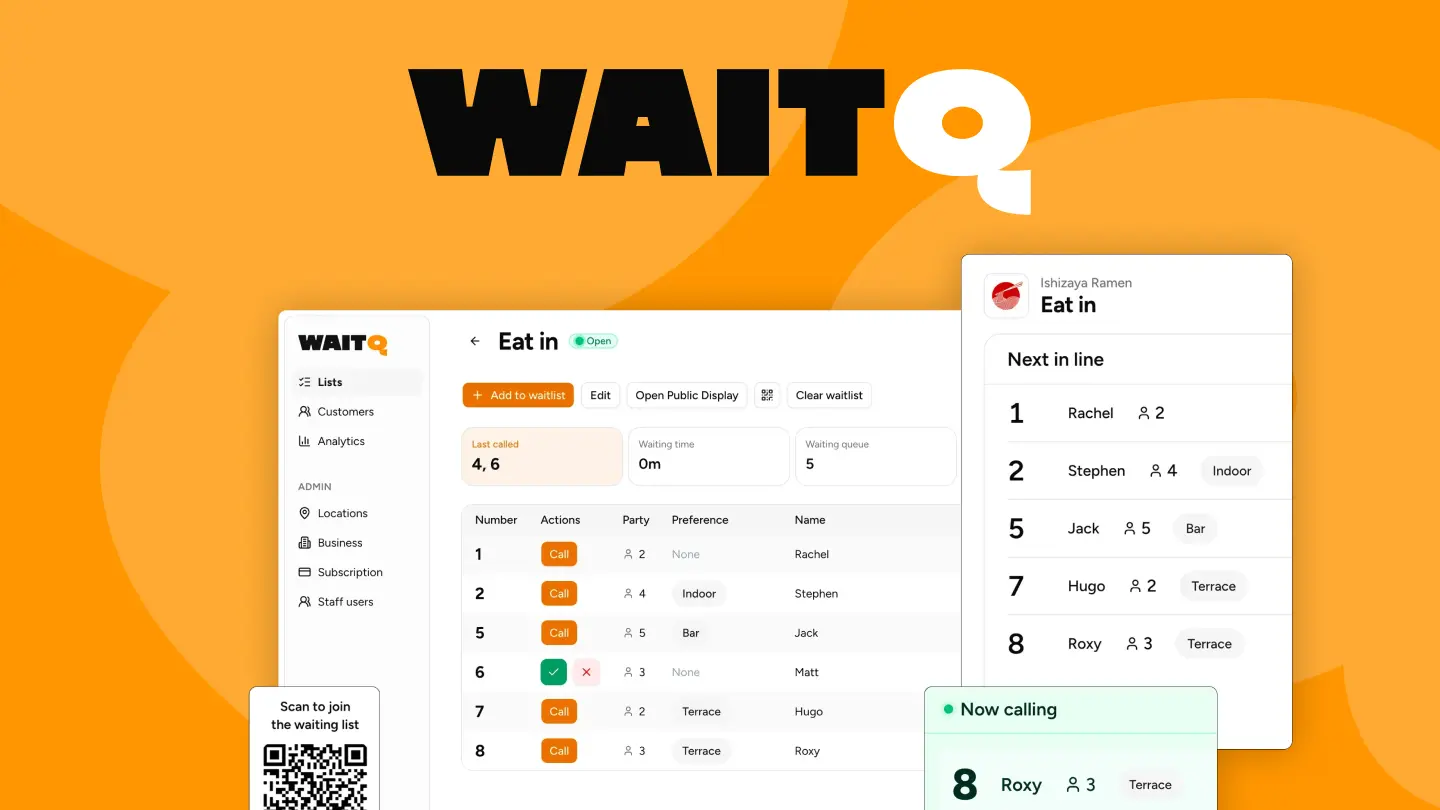
WaitQ is a digital queue management system built for walk-in businesses that need fast setup, multi-channel notifications, and flat predictable pricing. To join the queue, customers scan a QR code or enter details via kiosk and then get notified via SMS, WhatsApp, or email when it's their turn. No app download required, for customers or staff.
What makes it different: WaitQ is one of the few platforms that includes WhatsApp notifications alongside SMS and email at every paid tier. For businesses with international customers or in markets where WhatsApp is the dominant messaging channel, this matters. Every plan also includes unlimited customer visits, which means your monthly bill stays the same whether you serve 50 or 5,000 people.
Pricing: Plans start from $27/mo with unlimited customer visits and notification credits on every tier. The Grow and Business allow multi-location support with 2 and 5 business locations included respectively.
Pros: Unlimited visits and waitlists on all plans, WhatsApp notifications, QR code check-in, public queue display, 7-day free trial and flat pricing.
Cons: No built-in POS integrations, and notifications are staff-triggered rather than fully automatic.
Best for: Restaurants, salons, barbershops, hotels, and retail shops that serve walk-in customers and want the best value for money in a lean, flexible, multi-channel system without per-visit charges.
2. Waitwhile
Waitwhile combines walk-in queue management with appointment scheduling in one platform, which makes it the most natural fit for businesses that handle both. Setup takes around 30 minutes and the dashboard is approachable for non-technical teams.
What makes it different: Waitwhile has a reliable integration library: Mailchimp, Salesforce, and Zapier are all native connections. If your queue system needs to feed into a CRM or marketing tool, it's worth considering in this category.
Pricing:
- Free: 1 location, max of 100 visits/month
- Starter: $31/mo for 1 location, 250 visits/month
- Business: $55/mo for 1 location, 500 visits/month The visit cap is the critical detail here. At the Starter tier, you're capped at 250 visits per month per location. A moderately busy restaurant or salon hits that in under two weeks, at which point notifications stop until the month resets or you upgrade. Scaling to 6 locations with 2,000 monthly visits pushes the bill to $330/month. SMS is charged per message on lower tiers, adding further cost at volume.
Pros: Combined waitlist and appointments, modern UI, good third-party integrations.
Cons: Visit caps on all paid tiers, no WhatsApp, SMS costs extra on lower plans, pricing compounds quickly at scale.
Best for: Businesses that need both walk-in queuing and appointment scheduling, but not with high foot traffic.
3. Waitlist Me
Waitlist Me is one of the longest-standing waitlist tools on the market, with a simple interface and SMS capabilities. It works on iPads, Android tablets, and web browsers, and staff can manage queues from any device.
What makes it different: Transparent pricing. The platform has been around long enough to have a solid reliability track record.
Pricing:
- Premium: $35/mo per location (includes 1,000 texts/month)
- Pro: $60/mo per location The per-location billing is the key trade-off. Each location requires a separate subscription.
Pros: Simple and reliable, long track record, unlimited visits, good SMS bundling.
Cons: Per-location pricing gets expensive fast, no WhatsApp, no QR self check-in (staff-added only), US and Canada focused.
Best for: Small single-location businesses that want a reliable, no-frills waitlist with text notifications.
4. NextMe
NextMe is a virtual waitlist tool focused on restaurants and walk-in service businesses. Customers scan a QR code or visit a web link to join the queue, and staff notify them via SMS when it's their turn.
What makes it different: NextMe has a consumer-facing angle: businesses on the platform can be discovered by nearby customers through the NextMe app, which adds a passive marketing dimension for restaurants.
Pricing:
- Free: Basic waitlist (with limited features)
- Paid: from $49.99/mo per each location
Pros: Fast setup, QR check-in, clean staff dashboard, consumer discovery network for restaurants.
Cons: SMS only (no WhatsApp or email notifications), US-market focus limits international relevance, limited multi-location support that can quickly escalate in costs.
Best for: Single-location US restaurants that want waitlist management and passive customer discovery.
5. Qwaiting
Qwaiting is a cloud-based queue management platform designed for enterprise support and&or multi-branch businesses. It supports QR code check-in, SMS notifications, a staff dashboard, and analytics.
What makes it different: Qwaiting positions itself for businesses managing multiple service counters or branches simultaneously, with role-based access and service-level routing.
Pricing: $199/mo. Plans and feature tiers available on request.
Pros: Multi-branch support, service routing, analytics, QR check-in.
Cons: Higher entry price ($199/mo) than most tools, no WhatsApp notifications, setup more complex than SMB-focused tools.
Best for: Enterprise businesses that need counter-level routing and are comfortable with a sales-led buying process.
6. Waitly
Waitly is a restaurant-focused waitlist app built around the basics: add a customer, track their wait, send an SMS when you're ready. It's used primarily by US restaurants and handles the core walk-in queue flow through an iOS app.
Pricing:
- Free: 100 parties/month
- Premium: $49/mo (1,000 parties/month)
- Pro: $99/mo (3,000 parties/month) SMS notifications are disabled when the monthly cap is hit. This can happen mid-month, mid-service, without warning, regardless of plan.
Pros: Minimal setup, focused on restaurant workflow, fast to learn.
Cons: Requires iOS app, no WhatsApp, visit caps, limited multi-location capability, US-focused.
Best for: US restaurants that want a no-fuss waitlist app that don't mind the visit caps or the lack of international messaging support.
7. Carbonara
Carbonara is a free waitlist and reservation system built specifically for restaurants, cafes, and bars. It handles digital queues, online reservations, table management, and even drink pre-ordering. SMS and WhatsApp notifications are included.
What makes it different: Carbonara absorbs SMS costs entirely and charges nothing for the core feature set. For a restaurant that wants digital queuing without a monthly commitment, there's nothing cheaper that still covers notifications and table management.
Pricing: Free (restaurant-focused freemium model)
Pros: Free to use, SMS and WhatsApp included, QR check-in, table management, drink pre-ordering, used by 5,000+ venues.
Cons: Built exclusively for restaurants (not suitable for salons, hotels, events, or retail), requires the Carbonara app for staff management, limited analytics compared to paid tools, no multi-location dashboard.
Best for: Independent restaurants, cafes, and bars that want a free queue and reservation system and don't need multi-vertical or advanced analytics support.
8. Qminder
Qminder is a service queue management platform built for enterprise service operations. It runs on iPad kiosks at the entrance, where customers tap in their details and receive a ticket. The system handles complex service routing across multiple counters and staff members, which may seen as overkill for most SMBs.
What makes it different: Qminder's strength is service analytics. It tracks wait times, service times, and staff performance at a granular level, making it a useful tool for operations teams that need to optimise staffing based on queue data.
Pricing: ~$429/mo (published), with higher tiers for larger deployments.
Setup time: 1-2 weeks including kiosk configuration.
Pros: Strong analytics, multi-counter routing, established enterprise track record.
Cons: High entry price, iPad hardware required (additional cost), no WhatsApp, customers must interact with a kiosk rather than their own phone.
Best for: Service centres, government offices, and healthcare facilities with high daily volume and a need for detailed operational analytics.
9. QLess
QLess is an enterprise queue management platform serving government agencies, universities, healthcare systems, and large retail chains. Customers join a virtual queue via phone, SMS, or web, and receive automated SMS updates. The system handles complex multi-department routing and integrates with existing enterprise software.
What makes it different: QLess is built for scale and compliance. It has deep integrations into government and healthcare infrastructure, which matters for organisations that need to pass procurement reviews or connect queue data to existing case management systems.
Pricing: Custom (enterprise contracts only).
Setup time: 4-8 weeks.
Pros: Enterprise-grade reliability, complex routing, compliance-ready, phone and web check-in.
Cons: No self-serve pricing or setup, long implementation timeline, requires dedicated IT involvement, not suitable for SMBs.
Best for: Government agencies, large healthcare systems, and enterprise retail with complex multi-department queue needs and IT resources to support implementation.
What makes a queue management system worth using?
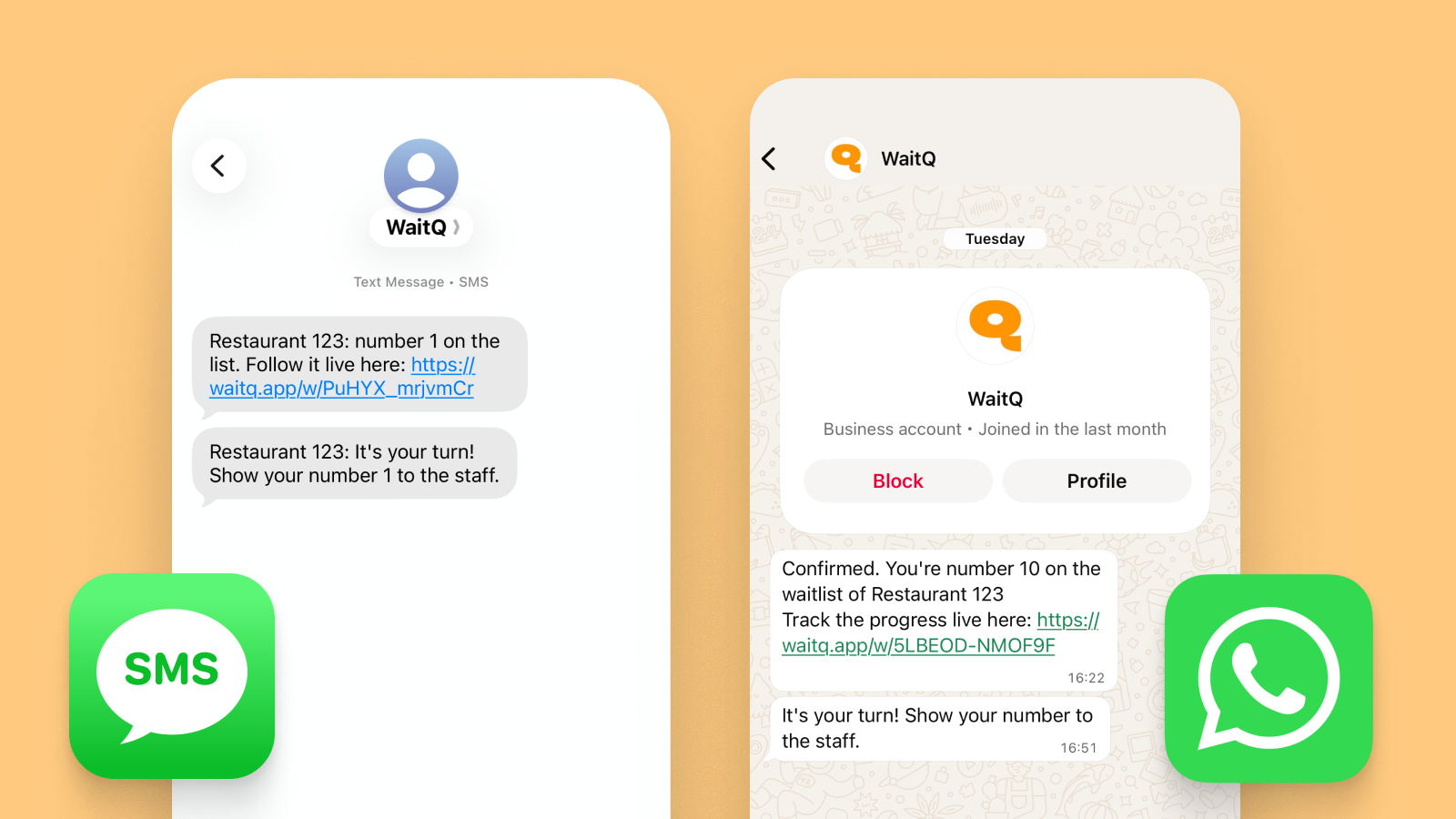 Multi-channel notifications is important feature for international businesses.
Three things consistently separate the tools worth paying for from everything else.
- Zero friction for customers. If a customer has to download an app to join your queue, most of them won't. The tools worth using let customers check in by scanning a QR code with their phone with no account required.
- Staff-triggered notifications. Notifications that fire without staff input create problems: a customer gets called when the team isn't ready, or the timing is off because a previous party ran long. The right model puts a single tap in the hands of your staff, who send the notification when they're actually ready for the next customer.
- Predictable pricing with no per-visit caps. Some platforms charge by the visit or cap monthly visits on lower tiers. For a busy restaurant or salon, those caps hit fast. When you hit the ceiling, the queue stops working or you pay extra, effectively penalising you for having a good month. Flat monthly pricing removes that equation entirely.
Which queue management system is right for your business?
The most common mistake businesses make when choosing a queue management system is optimising for low entry price without checking what happens at volume. A tool that caps visits at 250/month looks cheap until a busy Saturday lunch service uses 150 of those before noon. The cap doesn't care that you're full. It cuts your queue off anyway.
For most walk-in businesses, the right question is: what does this cost when I'm running at full capacity? Tools with unlimited visits and flat monthly pricing tend to win that calculation.
Use this framework to match your business situation to the right tool.
| Your business | Best fit |
| Restaurant, salon, or retail shop wanting fast setup and flat pricing | WaitQ |
| You need both walk-ins and appointments in one tool | Waitwhile |
| Single location, US-based and want something free | Carbonara (restaurant) or NextMe |
| Multiple locations with per-location budget concerns | WaitQ (multi-location support on paid plans) |
| You need WhatsApp notifications for international customers | WaitQ (or Carbonara if a restaurant) |
| High-volume service centre needing counter routing and analytics | Qminder |
| Government, healthcare enterprise, or complex multi-department routing | QLess |
| You want no monthly fee at all, even if limitations | Carbonara |
What do queue management systems cost?
For a single-location walk-in business, expect to pay between $0 and $60/month for a solid digital queue system with notifications. The $0 options (Carbonara, free tiers) are functional but come with feature or volume limits, while the $27-$59/mo range covers many SMB needs. Above $100/mo, you're typically paying for appointment scheduling, complex routing, or enterprise integrations.
Here's how the pricing landscape breaks down:
Free / freemium: Carbonara (restaurant-only), NextMe free tier (100 visits cap), Waitwhile free tier (100 visits cap). Good for testing, not for sustained use at volume.
SMB range ($27-$60/mo): WaitQ (from $27/mo, unlimited visits), Waitlist Me ($35-$60/mo per location), Waitwhile Starter ($31/mo, visit-capped), NextMe ($49.99/mo), Waitly ($49-$99/mo, visit-capped). This is where most walk-in businesses will land.
Mid-market ($100-$200/mo): Waitwhile Business tiers at scale, Qwaiting ($199/mo).
Enterprise (custom / $429/mo+): Qminder, QLess. Designed for organisations with IT teams and procurement processes.
The visit-cap trap: Several platforms advertise low starting prices but cap monthly visits. When a restaurant serving 80 covers a day hits a 250-visit monthly cap in three days, they're forced to upgrade or stop adding customers to the queue. Always calculate your expected monthly volume before committing to a plan.
Are there free queue management systems?
Yes. Carbonara offers a genuinely free plan for restaurants, covering digital queuing, SMS and WhatsApp notifications, and table management at no cost. NextMe (100 visits cap) and Waitwhile (100 visits cap) also offer free tiers. A handful of other tools also offer free tiers, but these typically cap monthly visits at a low number, meaning this allowance can be exhausted in a single day.
The more useful question is what a free tool costs in other ways. A queue system that cuts off notifications mid-service because you hit a cap, or that only works for one business type, or that has no analytics, creates operational gaps that compound quickly. For most walk-in businesses, the return on such tool shows up in the first week: fewer walk-aways, a calmer entrance, and customers who come back because the experience felt organised.
In other words: Free is a reasonable place to start, it is rarely a reasonable place to stay.
Choosing a queue management system: the short version
The best queue management system is the one your customers will actually use and your staff won't resent. That usually means no app downloads for customers, a dashboard simple enough to learn mid-shift, and pricing that doesn't punish you for being busy.
WaitQ is built specifically for the businesses that need queue management most: restaurants handling peak service, salons managing walk-in clients alongside booked appointments, barbershops running on reputation and flow, hotels easing front-desk congestion during check-in rushes, and events managing check-in lines.
Start with a 7-day free trial and have your queue live before end of day. For restaurants specifically, our guide on how to set up a digital queue walks through the full setup step by step.
