

Guest List vs Ticketing vs Registration: Which does your event need?
This guide sets out which events suit each of guest lists, tickets or registrations, what each one does at the door, how free sign-ups skew your headcount, and what to plan once people are inside.


Event software tends to blur three different jobs: selling entry, collecting attendee details and checking off invited names. Picking the wrong model shows up on the day, usually as a sign-up form nobody needed or a door team searching for names that were never collected. Each one is compared below, along with the case for a queue when people simply walk up.
| Guest list | Ticketing | Registration | |
| Main job | Confirms who is expected | Sells admission | Collects attendee information |
| Who gets on it | People the host adds | Anyone who buys | Anyone who completes the form |
| Payment | None | Taken at checkout | Optional |
| Data collected | Name, party size, a few notes | Buyer details and payment | Whatever the form asks for: sessions, roles, dietary needs, consents |
| Output | A roster of parties and a live headcount | Tickets and a sales record | Attendee records |
| At the door | Staff search a name and check the party in | Staff scan a ticket | Staff scan a code or search a name, sometimes print a badge |
| Typical events | Launches, private dinners, press and VIP lists, group arrivals | Concerts, festivals, paid classes | Conferences, trade shows, training days |
What is a guest list?
Of the three, the guest list asks the least of everyone involved. The host already knows the names, guests don't pay or fill anything in, and staff tick people off as they walk through the door.
Guest lists suit events where access is personal:
- Store openings and press previews
- Chef's tables, tastings and private dinners
- Wedding blocks and group hotel arrivals
- VIP, press and influencer lists at larger events
- Guest artist days at a salon or barbershop
Most hosts start from a spreadsheet they import, then add late names by hand. Each row is a party rather than a person, so "Ana Silva, 2" covers Ana and her plus-one. The headcount climbs by the full party size as each party checks in.
Guest list vs RSVP
An RSVP is the reply to an invitation. The guest list is where the yeses end up. You might collect RSVPs by email, message or phone, then copy each confirmed name and its party size onto the list your door team will use.
What is a door list?
A door list is the guest list as door staff use it at the entrance of a club, bar or venue. Nightlife uses the term most, because promoters and hosts often add their own guests to the list in the days before the night.
What is event ticketing?
Event ticketing sells admission. A buyer picks a ticket type and pays, then gets a code that staff scan at the entrance. Sales close once the event hits capacity.
Event ticketing has nothing to do with the numbered tickets handed out at a service counter. Queue tickets belong to a digital queue or a take-a-number system, which orders people by when they arrived.
A ticketing record is built around whoever paid. One person can buy six tickets for a group, and the record will usually hold one name and one email for all six. Events that need every attendee's name have to collect it some other way.
Ticketing fits when entry costs money and selling it is the main job:
- Concerts and festivals
- Paid workshops and classes
- Tastings or dinners with a cover charge
- Fundraising galas where tables are sold
What is event registration?
Event registration collects information about each attendee through a sign-up form. The form can ask for sessions, job titles, dietary needs, accessibility requirements, consents or anything else the event runs on, and it can be free or end with a payment step.
Conferences lean on registration to print badges, assign sessions and size the catering. Training providers use the same records to track who finished which course.
Every field you add has a cost. Sign-up gets slower, and you end up storing personal data you then have to protect.
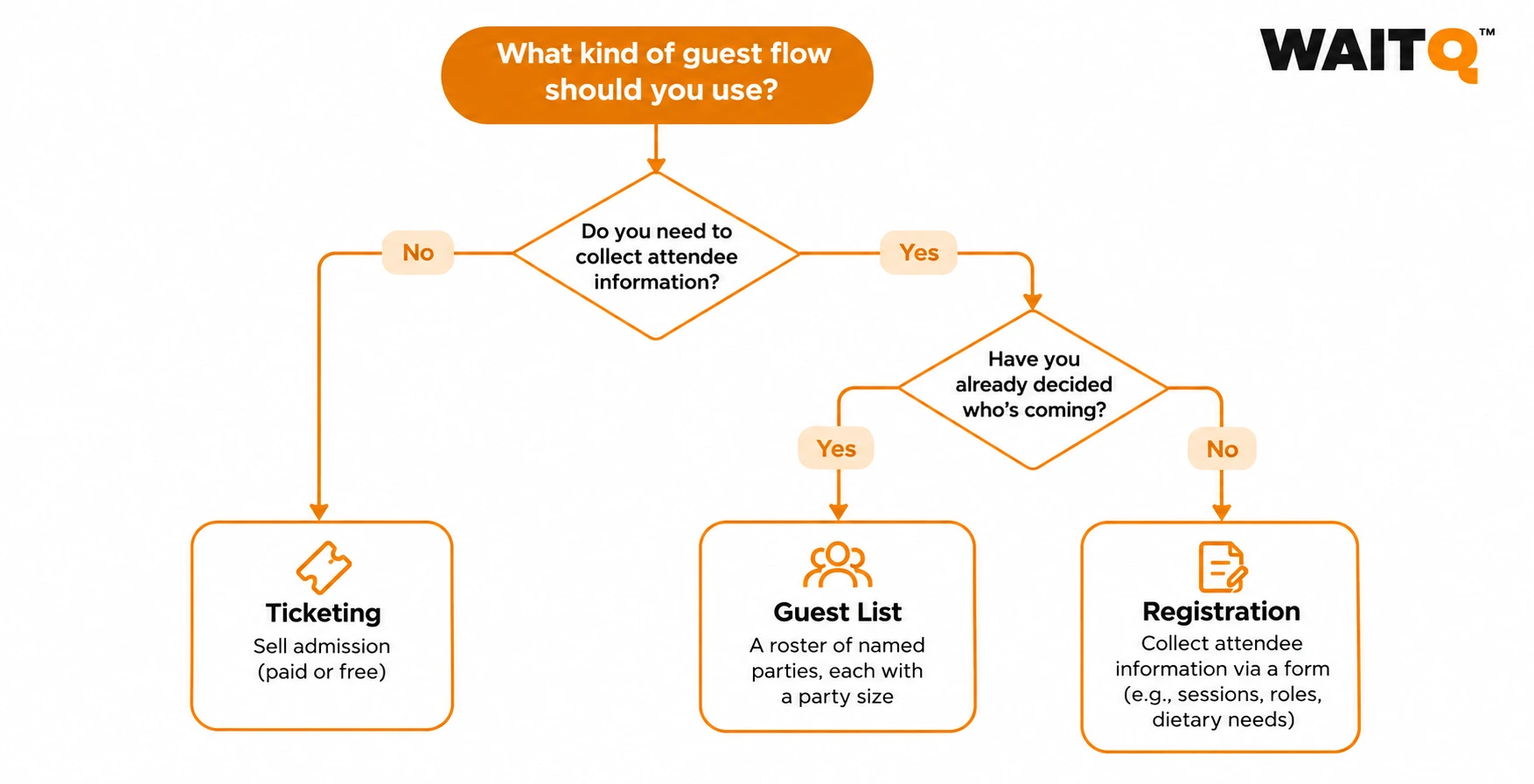
How do you choose between a guest list, ticketing and registration?
Answer the questions below in order. Most events are settled before you reach the last one.
- Do you charge for entry? If you do, you need ticketing or a registration tool with a payment step. Guest lists have no checkout, so they can't take money.
- Do you need more than a name and a party size? When staff only have to recognise people at the door, a guest list covers it. Collecting session choices, dietary needs or job titles from every attendee calls for registration.
- Is the audience known or capped in advance? If the host already knows who's coming, a guest list is the quickest route. Open sign-ups that need a limit work better through registration or ticketing with a capacity cap. Guest lists can carry a capacity warning as well, which helps when a venue has a fixed headcount.
Which setup fits your event type?
- Store opening or press preview: a guest list for press and VIPs, plus a queue for the public
- Chef's table or private tasting: a guest list
- Wedding block or group hotel arrival: a guest list shared between front desk and event staff
- Paid workshop or class: ticketing
- Free workshop with limited seats: registration with a capacity cap, or a guest list if every invite is personal
- Conference or trade show: registration, with paid passes sold inside it
- Festival or concert: ticketing at the gate and queues at the stations inside
- Fundraising gala: ticketing for the buyers, then a guest list or registration for every named seat
- Club or venue door: a guest list
Can one event use more than one?
Most events above a certain size combine at least two models. Each one covers a different group of people, so they rarely get in each other's way.
- Tickets plus a guest list. The public buys tickets while press, sponsors, talent and comps go on a guest list. Door staff work both, often at separate entrances.
- Registration plus a guest list. A conference registers attendees and keeps a short guest list for speakers and VIPs who should never see a form.
- Ticketing plus registration. A paid conference sells passes, then asks each attendee for session and dietary details.
- Any of the three plus a queue. Demos, signings and product stations inside the event still need some way to order people.
Why free events need a headcount plan
Free sign-ups overstate attendance. Across more than 1,000 events, free events had a median no-show rate of about 28%, compared with about 17% for paid events. Small free events lost an even larger share of the people they expected.
Plan around that gap:
- Use the free registration count as a ceiling when you book catering and staff.
- Cap the list at what the room can hold, and expect actual attendance to land below it.
- Mark no-shows once doors close, so the next event's estimate starts from who actually came.
- Report registrations and attendance as two separate numbers.
Whether an event charged for entry was the strongest predictor of no-shows in that dataset. Where charging doesn't fit, a guest list of people the host invited personally keeps the roster short and specific.
When does an event need a digital queue?
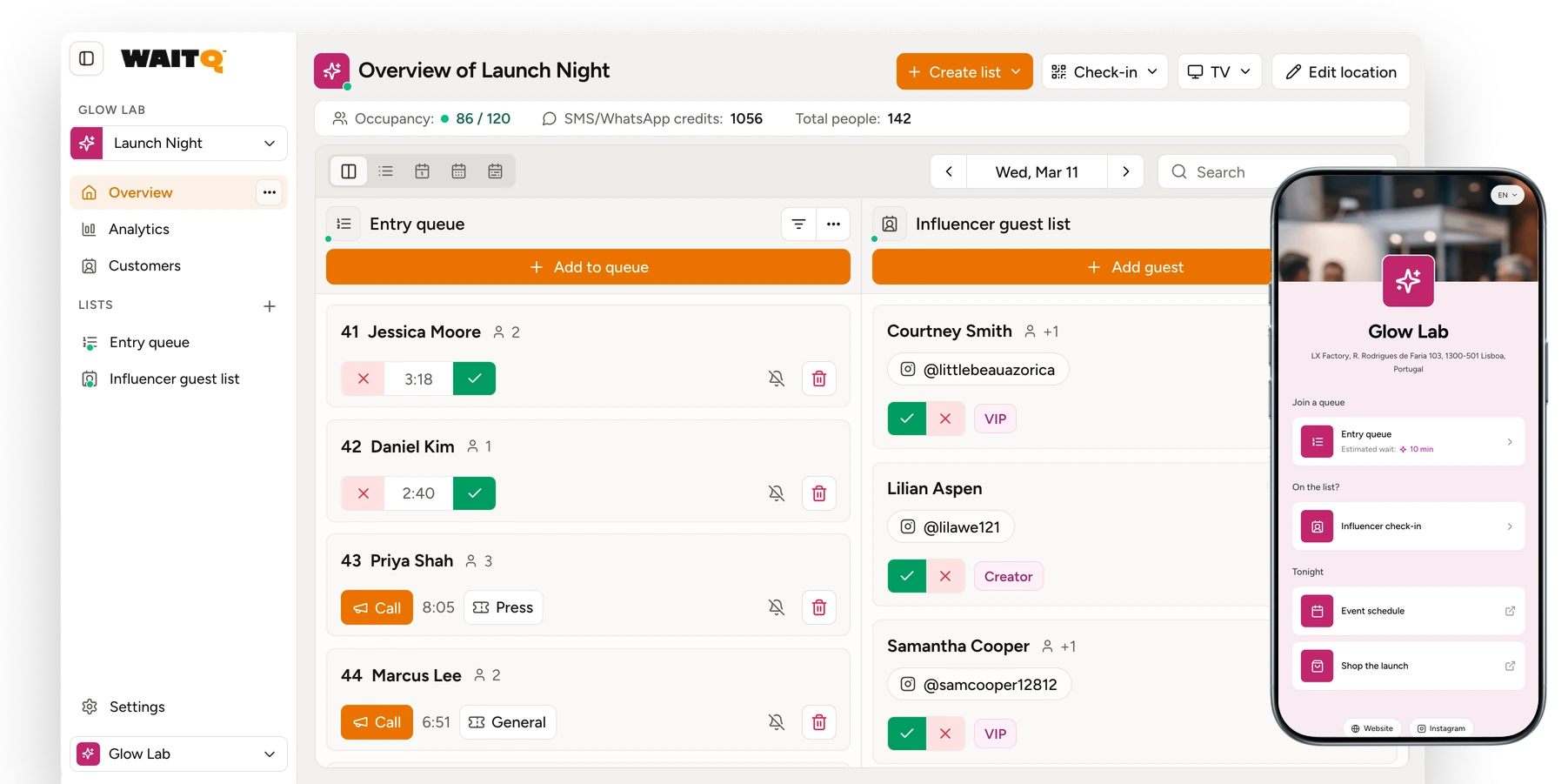
An event needs a queue when people turn up without signing up for anything. Guest lists, ticketing and registration all assume you know who's coming before the day, and walk-up visitors at a pop-up, a brand activation or a free festival stage never appear on any of them.
An event queue orders people by arrival for something with limited capacity, such as a demo, a signing, a tasting or entry to a full room. With a digital queue, attendees join from their own phone and wait wherever they like until staff call them.
Walk-up audiences
Open-door events draw people who decide on the spot. Store launches, food stalls, sampling stands and festival stations all work this way. A QR code on a banner or a table lets someone join in seconds, without an account or an app.
Stations inside the event
Check-in clears the entrance, and then demos, signings, tastings and product stations build crowds of their own. Give each station its own queue, so a long demo line doesn't hold up the signing table. Attendees join from a branded check-in page and keep exploring until staff reach them with push notifications, text message (SMS & WhatsApp) or email.
Standby for a full list
Guest lists and free registrations lose a share of people to no-shows. A standby queue at the door puts those empty spots to use: walk-ups join while they wait, and staff call them in as soon as the live headcount shows room.
What to set up before the day
- One QR code per queue, placed where people first notice the crowd
- A screen near the station showing who's being called, on any TV or tablet
- Custom fields limited to what staff need, such as party size or the product someone came for
- A notification channel attendees will actually see while they're away from the booth After the event, wait analytics show peak times, average waits and no-show rates for each station, which makes the next event easier to staff. Event teams comparing tools can start with our roundup of event queue management systems.
How WaitQ guest lists work at the door
We built guest lists around what door staff deal with during an arrival rush. One complaint kept coming up when we read reviews of event check-in tools: staff hunting for a name while the people behind that guest wait. Most of the decisions below trace back to it.
Name search comes first
Most door check-ins still happen by someone typing a name into a search box, so the state of the list decides how fast the door moves. On import, WaitQ skips guests already on that list for the same day, and staff can link a new entry to an existing customer record instead of creating a second one. Customize columns hides the fields that slow down scanning when arrivals pick up.
One row per party
A host plans in invitations, and the door needs a people count for the room. Each entry is one party with a party size, and the live headcount adds the full size at check-in, so a party of four counts as four.
A date, with no time slot
Time slots are what appointments are for. Guest list entries carry a date, which lets one list cover a multi-day event without turning every arrival into a booking.
Bulk actions show their impact first
Once entry closes, staff can mark every remaining party as a no-show in one go. Before anything changes, WaitQ shows how many parties and how many people are affected, and the action can be undone. Showing the consequence before a bulk change applies one of the oldest rules in interface design, the usability principle of error prevention.
Name is the only required field
Party size, phone, email, notes and custom fields are all optional. Hosts switch on what their door team will use, which keeps the list quick to scan and light on personal data.
Test it on the real door
WaitQ runs in the browser on the phones and tablets your staff already carry. Add a test party and check it in on those devices, over the venue's own connection, before the night.
Where WaitQ fits
WaitQ puts guest lists on the same dashboard as queues and appointments, so a venue or event team can check in invited guests and manage everyone else from one place. Guest lists also count toward location occupancy, which matters when a launch shares the floor with regular customers.
WaitQ doesn't sell tickets. For paid entry, run a ticketing tool for the public and keep press and VIPs on a WaitQ guest list, with a queue at each station inside. Guest lists are part of the Grow and Business plans, and one-off events can use an event Access Pass priced for that event alone with nothing to renew, so compare plans before you settle on a setup.
Frequently Asked Questions
Is a guest list the same as an RSVP?
No. An RSVP is the reply to an invitation, and the guest list is where the yeses end up. Each confirmed name goes onto the list with its party size, and that list is what door staff check people against.
Is event registration the same as ticketing?
No. Ticketing sells admission and keeps a record of whoever paid. Registration collects details about each attendee through a sign-up form, and it can be free or end with a payment step.
What is a door list?
A door list is a guest list used at the entrance of a club, bar or venue. Door staff search each name before letting the party in, and promoters often add their own guests in the days before the night.
Do free events have more no-shows than paid events?
Yes. Across more than 1,000 events, free events had a median no-show rate of about 28%, compared with about 17% for paid events. Small free events lost an even larger share of the people they expected.
Can you sell tickets and keep a guest list for the same event?
Yes. The public buys tickets, while press, sponsors, talent and comps go on a guest list. Door staff often work the two at separate entrances.
Does a guest list need a time slot for each guest?
No. A guest list records who is expected and on which day. A fixed time slot is an appointment, so a guest list suits arrivals spread across an evening or a multi-day event.
Does WaitQ sell event tickets?
No. WaitQ runs guest lists, queues and appointments from one dashboard. For paid entry, pair a ticketing tool with a WaitQ guest list for press and VIPs, and put a queue at each station inside.
When should an event use a queue instead of a guest list?
Use a queue when people show up without signing up first, or when a demo or station inside the event has limited capacity. A queue orders people by when they arrive and calls them back when it’s their turn. A guest list only checks off people the host already added.
