

Queue psychology: a guide to better waits for businesses
The minutes before service starts shape how customers judge the whole visit. Drawing on decades of research and operator reviews, this guide shows businesses how to run a digital queue that customers trust.


What is queue psychology?
Queue psychology is the study of how people experience waiting, which depends on uncertainty, fairness and what they can do while they wait as much as on the minutes that pass.
Perception drifts from the clock. As a result, two waits of the same length can feel completely different. The idea goes back to David Maister's paper, The Psychology of Waiting Lines, which framed satisfaction as the gap between what a customer perceives and what they expected.
In a study of supermarket checkouts, shoppers overestimated how long they had waited by an average of 36%. Maister listed eight principles that explain the drift, from idle time to perceived value. Designer Don Norman later revised them in his own version of the paper, adding ideas such as triage, letting customers pick a queue and how the end of a wait shapes the memory of it.
Most of the research since then has tested these ideas in call centres, ride-hailing apps and restaurants with digital queues. The principles hold up. What changed is the detail: how precise an estimate should be, how often to update people and what happens when the order can't be seen.
Queue psychology at a glance
Maister's eight principles, plus the newer finding on being last, were written for people standing in a room. Most of them still apply when the room becomes a phone screen.
| Principle | In a physical queue | What a digital queue fixes | What it can make worse | What to set up |
| Idle time feels longer | Customers stand with nothing to do | Customers wait wherever they like | Little, as long as they trust the alert | QR check-in and notifications |
| Uncertain waits feel longer | Customers guess from the size of the crowd | Live position and estimated wait | The estimate becomes a promise | An honest estimate that updates |
| Unexplained waits feel longer | Staff are too busy to explain | A delay reason can reach everyone | A position that stops moving with no message | A short delay update |
| Unfair waits feel longer | Customers check the order themselves | Order is timestamped | Order is invisible unless you show it | Public display and written priority rules |
| Waiting to start feels longer | Nothing happens until staff call | Joining becomes the first step of service | Silence after joining reads as being forgotten | Instant join confirmation |
| Anxiety makes waits feel longer | Fear of missing your name | The alert reaches customers anywhere | "Did they forget me?" moves to the phone | Confirmation, updates and a grace period |
| Solo waits feel longer | Alone in a waiting area | Customers can wait with friends or somewhere social | Nothing | Let groups join as one entry |
| Valued services earn longer waits | Long queues for things worth waiting for | Nothing changes | Nothing | Show what customers are waiting for |
| Being last hurts | The last person sees nobody behind them | Nobody can see they're last | Nobody can see others joined after them | Decide what the display shows |
Note: This article covers waits at physical businesses, such as restaurants, barbershops, salons, clinics, hotels, shops and event venues, where customers join a queue from their phone and wait nearby. Online waiting rooms for ticket sales or website traffic follow different rules and aren't covered here.
What changes when the queue goes digital?
A digital queue changes where customers wait and what they can see. Some principles become easier to manage, and a few new problems appear because the queue is no longer visible.
What a digital queue fixes
A digital queue fixes the principles that depend on where customers wait and what they know. Once customers can join by QR code check-in or a kiosk and follow their position on their phone, four of Maister's principles work in the business's favour.
- Idle time. A customer who can get a coffee, sit in the car or browse a nearby shop is no longer waiting in the way Maister described. Tracking the wait turns into ordinary time with an alert at the end.
- Uncertain waits. A live position and an estimated wait answer the question customers would otherwise ask staff every few minutes. Position matters on its own, because watching a number fall from six to two shows progress even when the estimate barely moves.
- Unexplained waits. A short message can reach everyone waiting, wherever they are. Explaining a delay from the front desk only reaches the people standing in front of it.
- Waiting to start. Maister observed that waiting before service begins feels longer than waiting once it has started. Joining from a branded check-in page, choosing a service and getting a confirmation all count as the start.
The evidence from restaurants supports this. One study of restaurants that let diners join from their phone found 24.7% fewer complaints about the wait to be seated, with no rise in complaints about waiting for food once seated. The effect was strongest for restaurants surrounded by similar options nearby, where an annoyed diner has somewhere else to go.
What a digital queue makes harder
A digital queue moves the wait out of sight, and some of the cues customers relied on go with it. Three problems are specific to queues customers can't see.
- Nobody can see who joined after them. Harvard Business School research on queues found that people in last place are less satisfied and more likely to switch queues or give up. Customers who spent their entire wait in last place were 19% less satisfied than other participants, even with the same wait and the same number of people ahead. Transparency is the fix: when people couldn't see that they were last, the effect disappeared, and when they could see they weren't last, far fewer gave up. A phone screen showing only your own position hides last place, which helps the newest arrival. A public display showing the whole queue lets everyone see people joining after them, which helps the rest.
- The order exists only in the system. In a physical queue, customers police fairness themselves. In a digital queue, a customer who watches their position jump backwards has no way to tell why. An appointment slotting in, or a staff member taking someone from another queue, may look like queue-jumping unless the rule is written down where customers can read it.
- The walk back decides how the wait is remembered. Norman's revision of Maister stresses that the end of an experience weighs heavily in how people remember it. In a digital queue, the end is the notification and the walk back. A customer called too late finds their turn gone; one called too early stands at the door again, waiting in the exact way the queue was meant to prevent. Notify customers far enough ahead to cover the walk back, and give them a grace period, such as ten minutes, to show up.
Uncertainty is the principle I see hurt businesses most. A customer who can check their position at any moment stops asking staff how long it will be, and staff get those minutes back for the people in front of them.
Queue psychology: Best practices for businesses
The research translates into a handful of practices that work with any queue tool, from a paper list with text messages to dedicated software.
Plan for every moment of the wait
For your customer a wait is a sequence of moments, each one raising a different question to address.
| Moment | What your customer is wondering | What to give them |
| Before joining | "Is it worth it?" | The current wait and the number of people ahead, before you ask for any details |
| Joined | "Did it work?" | Instant confirmation with position and estimate |
| Waiting | "Is it moving?" | A live position they can check whenever they want |
| Delayed | "Have they forgotten me?" | A reason, and confirmation that their place is kept |
| Nearly their turn | "Should I head back?" | An alert timed to the walk back |
| Called | "How long do I have?" | A clear instruction and the grace period |
| Missed the call | "Have I lost my place?" | A rule you've set in advance and shown on the check-in page |
| Leaving | "Can I just go?" | A simple way to leave the queue, so staff aren't calling someone who has gone |
Make updating the queue part of the routine
The estimate a customer sees depends on the statuses your team updates. A host who forgets to mark a table as free, or a barber who doesn't tap "done", throws off the estimate for everyone in the queue. Make updating the queue part of the moment service ends, and check during a trial whether your team actually does it during the rush.
Should you overestimate wait times?
Keep the estimate as honest as possible; if anything add a slight buffer time.
The case for padding comes from satisfaction research. A study in the Journal of Retailing found that waiting shorter than expected substantially increased satisfaction, while waiting somewhat longer than expected caused only a minor drop.
In practice:
- Base the estimate on live data from recent services instead of a fixed number.
- Show a narrow range, such as "15 to 20 minutes", and let the top of the range do the job a buffer would. Wide ranges such as "15 to 45 minutes" read as a guess.
- Update customers when the estimate moves by more than a few minutes, in either direction.
Plan for when things go wrong
Notifications fail: phones are on silent, numbers are mistyped and networks drop. Decide three things before you launch:
- Which channel your customers actually check, and whether you can offer more than one.
- How anyone who misses the alert will still find out it's their turn, such as a screen or a name called at the door.
- How customers join if they won't scan a QR code or share a phone number. A kiosk or staff-assisted entry as a fallback covers most of these cases.
Agree the rules of the queue before you show them
A digital queue can show the order, but deciding what that order should be is a conversation your team has to have first. Write down who goes next when a customer's preferred staff member is busy, how appointments fit around walk-ins and who counts as a priority, then put those rules on the check-in page.
The public display adds a trade-off between fairness and privacy. Showing names lets customers check the order, and hiding them protects their privacy. A clinic should lean towards privacy, and a barbershop towards visible order.
Send fewer messages, and time them well
A recent experiment on queue abandonment found that pairing distraction with periodic updates increased abandonment, while letting people check their position on demand kept them waiting. Keep messages for moments when the customer needs to act or needs reassurance, and let the live position on their phone cover the rest. For the wording, feel free to adapt our SMS waitlist templates for joining, delays and the call back.
What we learned designing WaitQ, and how we applied it
The principles in this guide shaped how we built WaitQ, a cloud platform for queues, appointments and guest lists. Before designing it, as part of our research, we went through public reviews of queue, booking and guest list tools across businesses like restaurants, hotels, salons, barbershops, clinics, retail and events. Reviews aren't a representative survey, though they show where queues break for the businesses running them, and those problems map closely onto Maister's principles.
Four findings shaped WaitQ the most:
- Estimates break at the staff screen. Operators wrote that "sometimes the wait time are a little inaccurate", and the cause was usually a status nobody updated. We kept calling, serving and marking someone as gone to a single tap on a phone.
- Missed notifications came up frequently. Customers in WaitQ choose their own channel, and the public display stays on as a fallback for anyone who misses the alert.
- Not everyone will scan a QR code or share a phone number. Reviews of restaurant tools mention guests refusing to give their number, and research on older patients shows some people need a person or a paper route. Alongside QR codes and links, WaitQ supports push notifications (no number needed), kiosk and staff entry.
- Fairness and privacy pull in different directions. Barbershop owners talk about "floor fairness" and complain about staff "altering the order of service", while clinics need to protect patient names. WaitQ lets each business show or hide names on the display, and run separate queues per service or staff member.
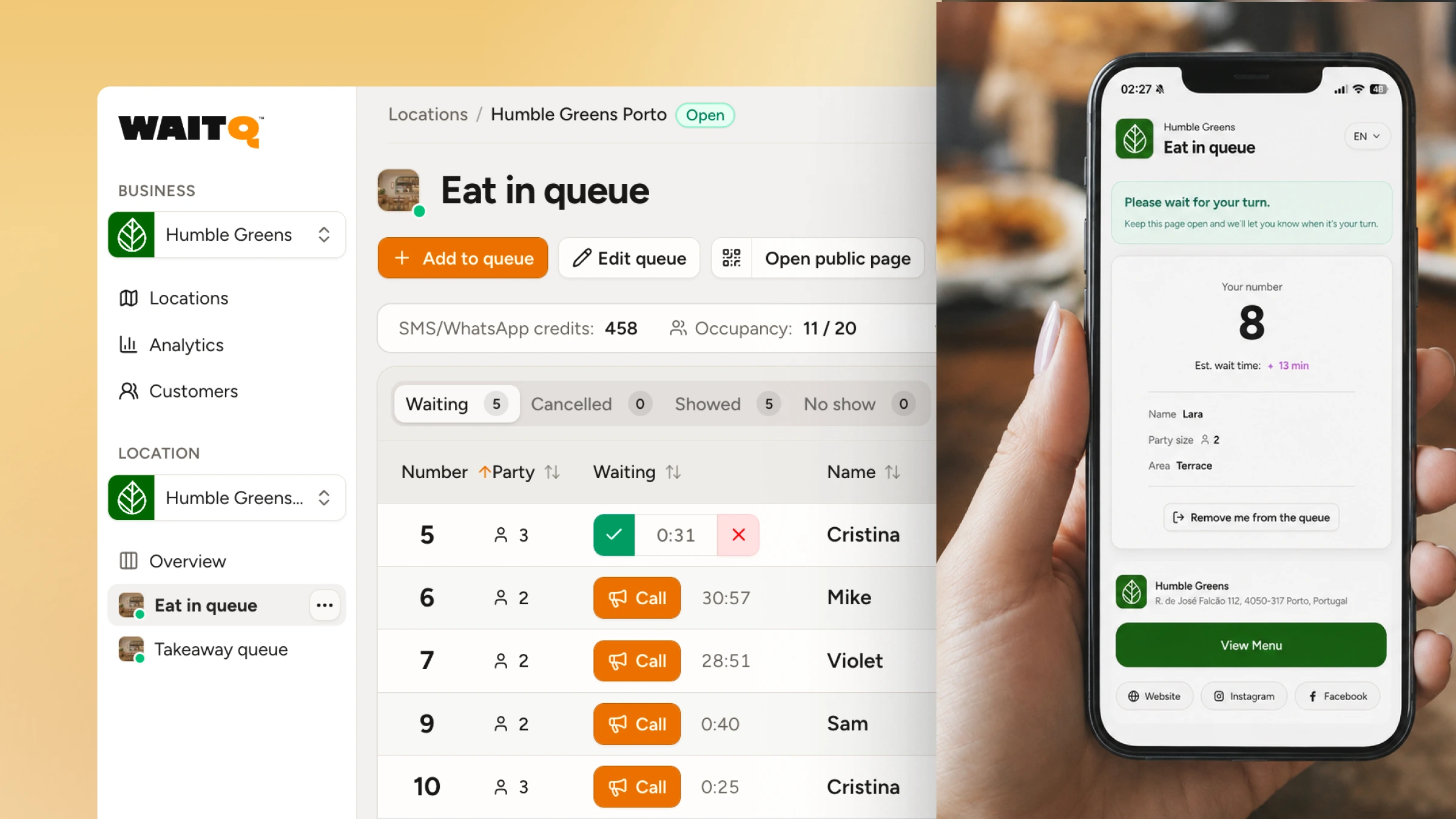
In practice, WaitQ covers:
- Joining: QR code, kiosk or link to a branded check-in page, with no app to download.
- Seeing the wait: position and estimated wait on each customer's phone, plus a TV display of the whole queue with names shown or hidden.
- Fair order: separate queues per service or staff member, priority flags and appointments alongside walk-ins.
- Messages: push notifications on iPhone and Android, text message (SMS & WhatsApp) and email, with the customer able to choose the notification channel.
- Measuring: analytics on waits, peak hours and walk-aways, with unlimited customer visits on every plan.
WaitQ doesn't add staff or shorten a service, so it won't change how long the work takes. It can, however, cut the dead time between customers, because the next person is already on their way when a chair or table frees up.
Designing the wait with purpose
The research on waiting has stayed remarkably stable for decades, and the newer field studies mostly sharpen it. Customers react to what they can see about their wait and whether it feels fair. They also react to the estimate itself, to how often they're interrupted and to whether they can see progress. Letting customers leave the waiting area fixes the oldest problems, and it asks the business to make the order, the estimate and the call back visible, since customers can no longer see them for themselves.
WaitQ gives you the pieces to do that: a branded check-in page, live position on every customer's phone, a public display and messages on the channel each customer picks. To try the setup with your own queue, compare plans and start a free 7-day trial.
Frequently Asked Questions
What is the psychology of waiting?
The psychology of waiting is the study of how people experience a wait. Perceived wait depends on uncertainty, fairness, anxiety and what people can do while they wait, as much as on the actual minutes. Shoppers in one supermarket study overestimated their checkout wait by an average of 36%, and the size of that gap varies with how the wait is managed.
What are Maister’s principles of waiting?
David Maister's paper The Psychology of Waiting Lines lists eight principles. Idle time feels longer than occupied time. Waiting before service starts feels longer than waiting during it. Anxiety makes waits feel longer. Uncertain waits feel longer than known, finite waits. Unexplained waits feel longer than explained ones. Unfair waits feel longer than fair ones. The more valuable the service, the longer people will wait for it. Solo waits feel longer than group waits. Maister framed all eight around one rule: satisfaction is the gap between what customers perceive and what they expected.
Why do waits feel longer than they are?
Waits feel longer when people have nothing to do, don't know how long they'll wait, can't see progress or worry about losing their place. Each of these pulls attention back to the clock. Research on queues also shows that being last in line, or watching a queue stall early on, makes people more likely to give up even when the total wait is the same.
Do digital queues make waits feel shorter?
Digital queues address idle, uncertain and unexplained waits, because customers can wait elsewhere, see their position and receive updates. One study of restaurants that let diners join from their phone found 24.7% fewer complaints about the wait to be seated, with no rise in complaints about waiting for food. Another found that waiting from a phone lowered the perceived cost of waiting. Digital queues can also hide the order and leave customers anxious if they hear nothing after joining.
Should businesses overestimate wait times?
Lean slightly high and keep the estimate updated. A large buffer backfires because a long estimate stops customers from joining.
How do you make a digital queue feel fair?
A digital queue feels fair when customers can see the order and the exceptions are explained. Show the queue on a public display, use separate queues per service or staff member, and state on the check-in page how appointments and priority customers are handled.
