

Managing a queue in Singapore isn't optional. Whether you run a restaurant, a hair salon in Bugis, a hotel front desk, or a government service counter, customers expect to know how long they'll wait and to be told when it's their turn.
The tools that handle this range from browser-based apps that take five minutes to set up, all the way to hardware systems with physical kiosks, display boards, and on-site installation.
If you run a walk-in business with one or a handful of locations, the SMB section is where you'll find your answer. If you're managing customer flow across a hospital, bank branch, or multi-counter government office, head to the enterprise section.
Queue management software for small businesses in Singapore
The best queue management software for small businesses in Singapore is a browser-based tool that requires no hardware, lets customers check in via QR code from their phone, and notifies them via SMS or WhatsApp when it's their turn.
Most walk-in businesses in Singapore don't need kiosks, ticket printers, or IT support to manage a queue. The tools in this tier run on any device with a browser, set up in minutes, and handle everything from a single-location café to a multi-branch salon group.
Here's how the main options compare:
| Tool | Starting price | Visit limits | WhatsApp support | Best for |
| WaitQ | $27/mo (annual) | Unlimited | Yes | Restaurants, salons, barbershops, hotels, retail |
| Waitwhile | $31/mo (annual) | 250/mo on entry plan | No | Mixed walk-in and appointment businesses |
| Qwaiting | $199/mo per location | Not capped | No | Larger SMBs needing digital signage and multi-channel setup |
| OneWayQueue | S$100/mo | Unlimited | WhatsApp only | Businesses with a waiting room TV display |
WaitQ
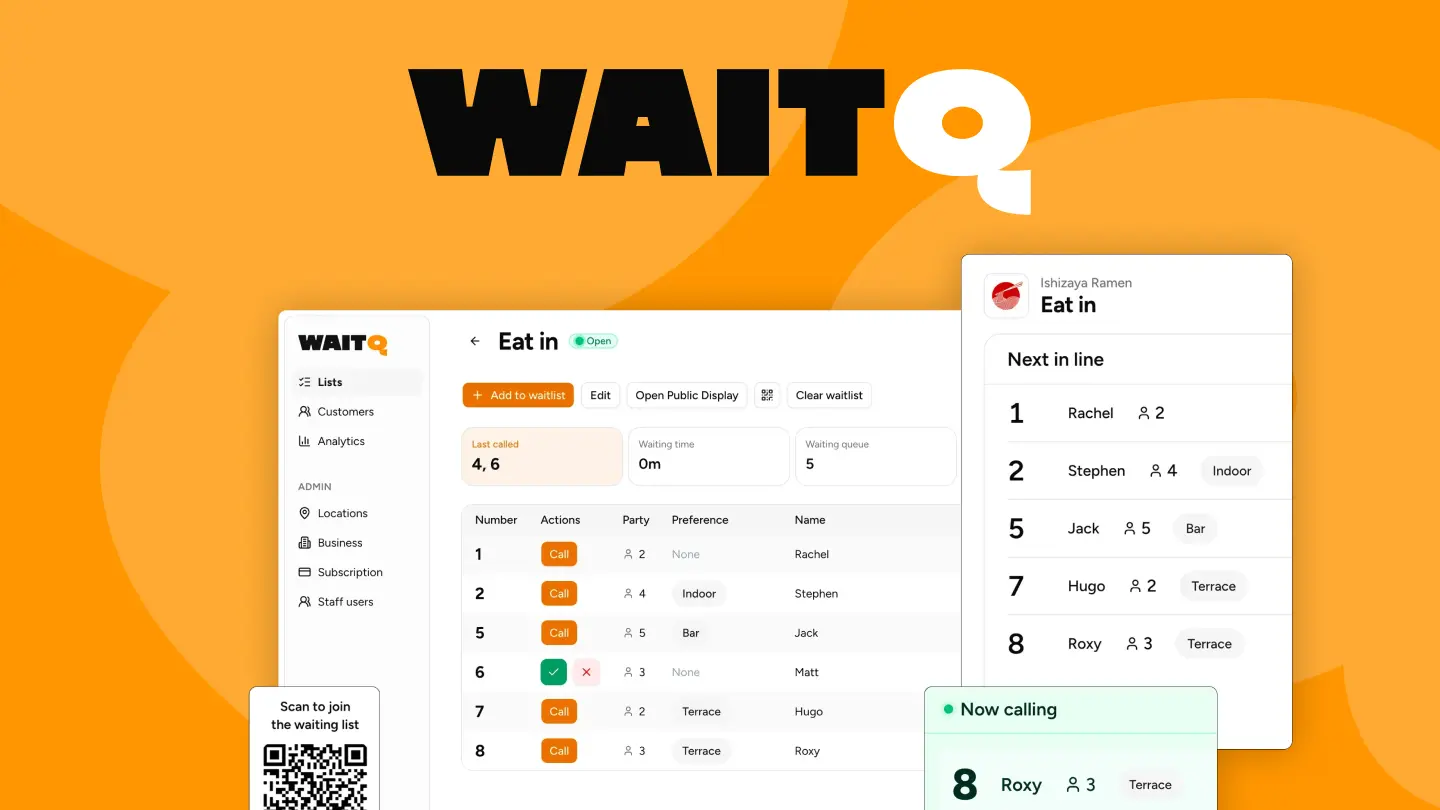
WaitQ is an intuitive, design-first tool to manage queues of different business types. Customers scan a QR code or use the branded business page to join from their phone. No app download, no front desk bottleneck. Staff see the full queue on any device, tap to call the next person, and send a push, SMS, WhatsApp or email notification in one move.
Every WaitQ plan includes unlimited visits, which means your bill stays flat regardless of how busy you get. Starter begins at S$36/month when billed annually and includes push notifications, SMS, WhatsApp and email; Grow and Business add more capacity for busier or multi-location teams.
WaitQ works well for restaurants, hair salons, barbershops, hotels, beauty studios, and retail service counters. It's the strongest option for Singapore walk-in businesses that want a combination of fast setup and predictable pricing. It also handles appointments alongside walk-ins in the same queue, so businesses running a mix of both don't need a second tool.
Waitwhile
Waitwhile handles both walk-ins and appointments from a single dashboard, which makes it a reasonable pick for businesses that take a mix of both. The entry plan covers 250 visits per month, which is a meaningful constraint for busier operations. SMS notifications cost extra, and there's no WhatsApp support.
Qwaiting
Qwaiting positions itself toward larger SMBs and enterprise clients: banks, hospitals, and Changi Airport are referenced clients. For businesses at that scale, the feature depth around digital signage, appointment booking, and multi-channel integrations can justify the cost. Pricing actually spans $199 to $649/month across four tiers, not a single flat figure. For a single-location walk-in business, the entry price and setup complexity are harder to justify.
OneWayQueue
OneWayQueue is a Singapore-built queue tool with a TV display focus. It works well for businesses that have a physical waiting room and want to show queue status on a screen. Customers are notified via WhatsApp only, so anyone not on WhatsApp won't get an alert. It also requires a daily or weekly PIN reset to prevent phantom queues and needs an HDMI-connected smart TV for the display. Pricing starts at S$100/month.
Enterprise queue management systems in Singapore
Enterprise queue management systems combine hardware kiosks, display boards, ticketing printers, and back-end analytics into a managed deployment. They're designed for high-volume, multi-counter environments where customers interact with a physical machine to take a number before being called to a counter.
These platforms are suited for:
- Banks and financial institutions managing counter traffic across multiple branches
- Public hospitals and polyclinics with high daily patient volumes and triage requirements
- Government service centres handling walk-ins across multiple agencies
- Telco flagship stores with multiple service types and long dwell times
- Large retail flagships with fitting rooms, service desks, and concierge counters
QueueBee
QueueBee is one of the most established queue management vendors in Singapore and Southeast Asia. Their platform covers virtual queuing, appointment scheduling, customer feedback, and digital signage in a single system. Clients include retail malls, hospitals, and government institutions across the region. Setup requires vendor engagement and hardware installation. Pricing is not publicly listed.
Qtrac
Qtrac is an enterprise virtual queue platform with a focus on customer journey management and analytics. It supports appointment scheduling alongside walk-in queuing and is used by large-scale retail, healthcare, and financial clients globally. Like most enterprise systems, deployment involves a sales and implementation process.
Efficient Systems
Efficient Systems is a Singapore-based provider of physical queue number systems and digital queue management solutions. Their hardware runs on Android-based kiosk units and is designed for banks, healthcare facilities, and service counters that require on-premise stability and real-time updates. A good option for operations that need locally supported hardware.
How queue management works across Singapore's key verticals
Queue management software looks different depending on the type of business. Here's what matters most by vertical:
| Vertical | Key Considerations |
| Restaurants and F&B | Walk-in diners join via QR code at the door and receive an SMS or WhatsApp when their table is ready. The key feature is a public-facing display screen so waiting groups can see where they are in line without hovering at the host stand. Digital waitlist management for restaurants handles this without a dedicated tablet or hardware purchase. |
| Hair salons and beauty studios | Clients often want a specific stylist, which adds routing complexity to the queue. A hair salon waitlist app needs to support multi-stylist queues and walk-in self check-in. SMS and WhatsApp notifications let clients browse nearby while they wait. |
| Barbershops | Similar to salons, but typically faster service times and higher walk-in volume. The priority is speed: quick check-in, accurate wait estimates, and immediate notification. See how a barbershop waitlist app handles this. |
| Hotels | Front desks need guests to check in smoothly during peak arrival windows without crowding the lobby. A hotel queue system lets guests wait comfortably nearby and get notified via SMS or WhatsApp the moment their room is ready. |
| Retail service counters | Telecom shops, electronics stores, and fashion boutiques with fitting room queues benefit from retail queue management tools that handle multiple service types from a single dashboard. |
| Events and brand activations | Pop-up events and brand experiences in Singapore use queue tools to manage crowds at product stations and photo moments. The event waitlist app use case is time-limited and high-volume. |
What should you look for when choosing a queue management system in Singapore?
The right queue management system for your Singapore business depends on three factors: your customer volume, your notification preferences, and whether you need hardware.
For most walk-in SMBs, the checklist looks like this:
- WhatsApp support: WhatsApp is the primary messaging channel in Singapore. A system without it will miss a significant portion of your customer base.
- No visit caps: Tools that charge per visit or cap monthly volume will cost more as your business grows. Unlimited visit pricing gives you predictable costs.
- No hardware required: Browser-based tools that work on any device are easier to set up, maintain, and scale across locations.
- Self check-in via QR code: Customers join the queue from their own phone. No staff needed at the door, no app to download.
- Multi-location support: If you have more than one location or plan to expand, check whether the tool supports this on the plan you're considering.
For enterprise operations, the checklist shifts toward hardware reliability, on-premise deployment options, integration with existing CRM or ticketing systems, and local support.
How WaitQ handles queue management for Singapore walk-in businesses
WaitQ is designed for the type of business where customers arrive at the door without an appointment and need to know where they stand. It covers the full queue flow from a single dashboard: customers check in via QR code, staff see who's waiting in real time, and a tap sends a push notification, text message (SMS, WhatsApp) or email when it's their turn.
All plans include unlimited customer visits with no hardware to install, no app for customers to download, and no onboarding call required. Most businesses are live in under five minutes.
WaitQ is a good fit for restaurants, salons, barbershops, hotels, beauty studios, and retail service counters in Singapore. Start a 7-day free trial and see how it fits your operation.
