

How to run service desk queues for Holiday returns and Black Friday
Black Friday week brings pickups and gift wrapping, and the weeks after Christmas bring returns and repairs. This plan gives each service counter its own virtual queue so shoppers keep browsing while they wait, and covers setup, messages, metrics and what to keep after January.

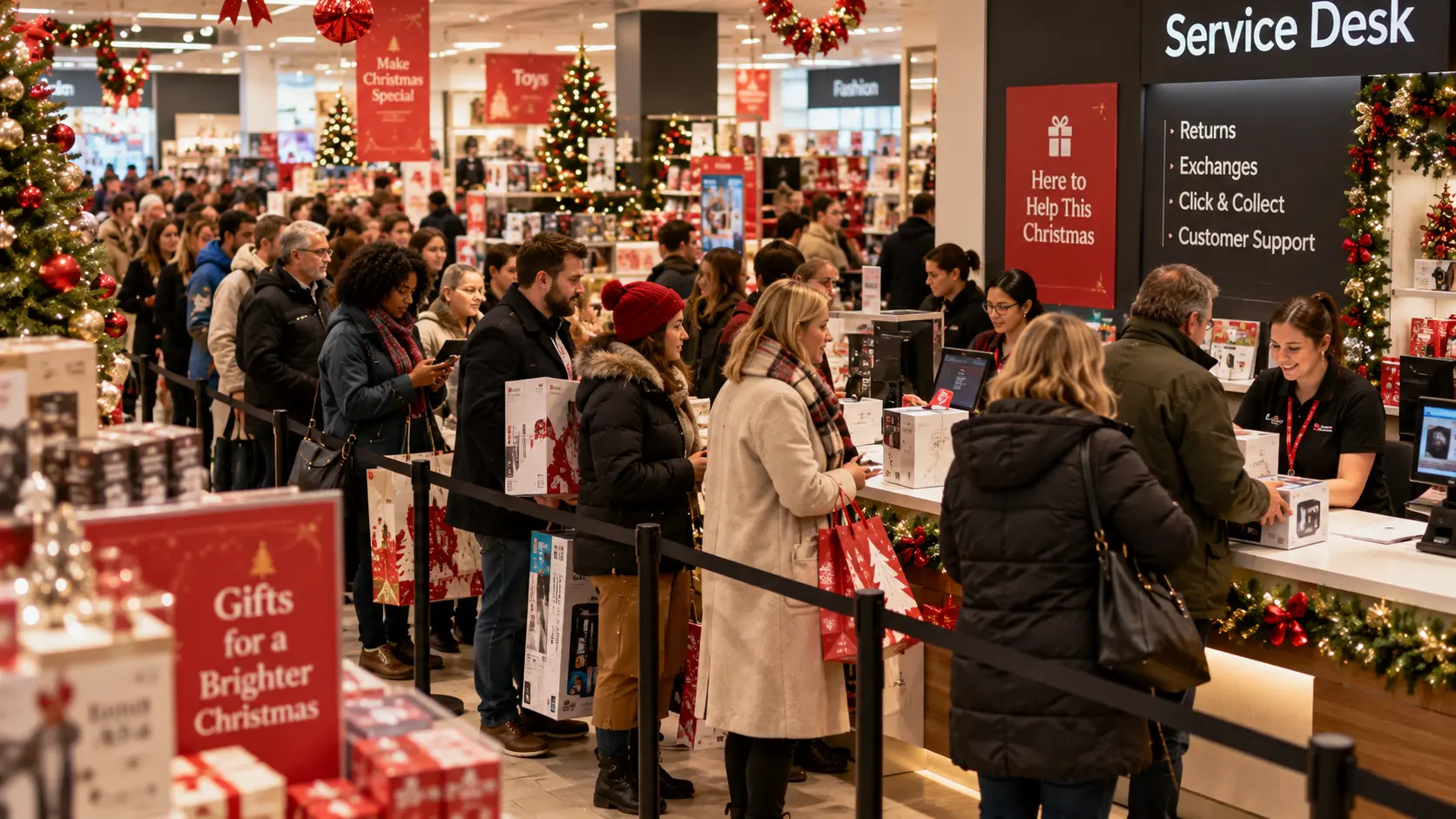
Holiday planning tends to focus on checkout, while the service desk is where Black Friday pickups and January returns quietly pile up. Giving each counter its own digital queue helps: shoppers check in by QR code or kiosk, carry on browsing and come back when someone is free. Returns, exchanges, repairs, click and collect, gift wrapping and consultations can all run this way, with each shopper's place held while they're away from the desk.
This plan is for service counters only. A digital queue doesn't scan items, add tills or process refunds, so checkout, your POS and your order management system (OMS) carry on exactly as they do now. What changes is the crowd in front of the service desk.
Holiday service desk queue plan
| Service point | Peak window | Why it backs up | Queue setup | Fields to collect |
| Returns and exchanges | 26 December to mid-January | Receipt, condition and refund checks take several minutes each | Its own queue, with exchanges as a service type | Receipt or gift receipt, item category |
| Click and collect | Black Friday week to Christmas Eve | Staff fetch each order from the stockroom | Its own queue, kept apart from returns | Order number |
| Repairs and warranty | Late December into January | Diagnosis time varies from minutes to an hour | Appointments plus a walk-in queue | Product type, short issue description |
| Gift wrapping | Black Friday week to Christmas Eve | Weekend and late-evening bursts | Its own queue, paused after Christmas | Number of items |
| Consultations and fittings | Black Friday week and the January sales | Long sessions hold up short requests | Appointments, with walk-ins when a slot opens | Service or specialist |
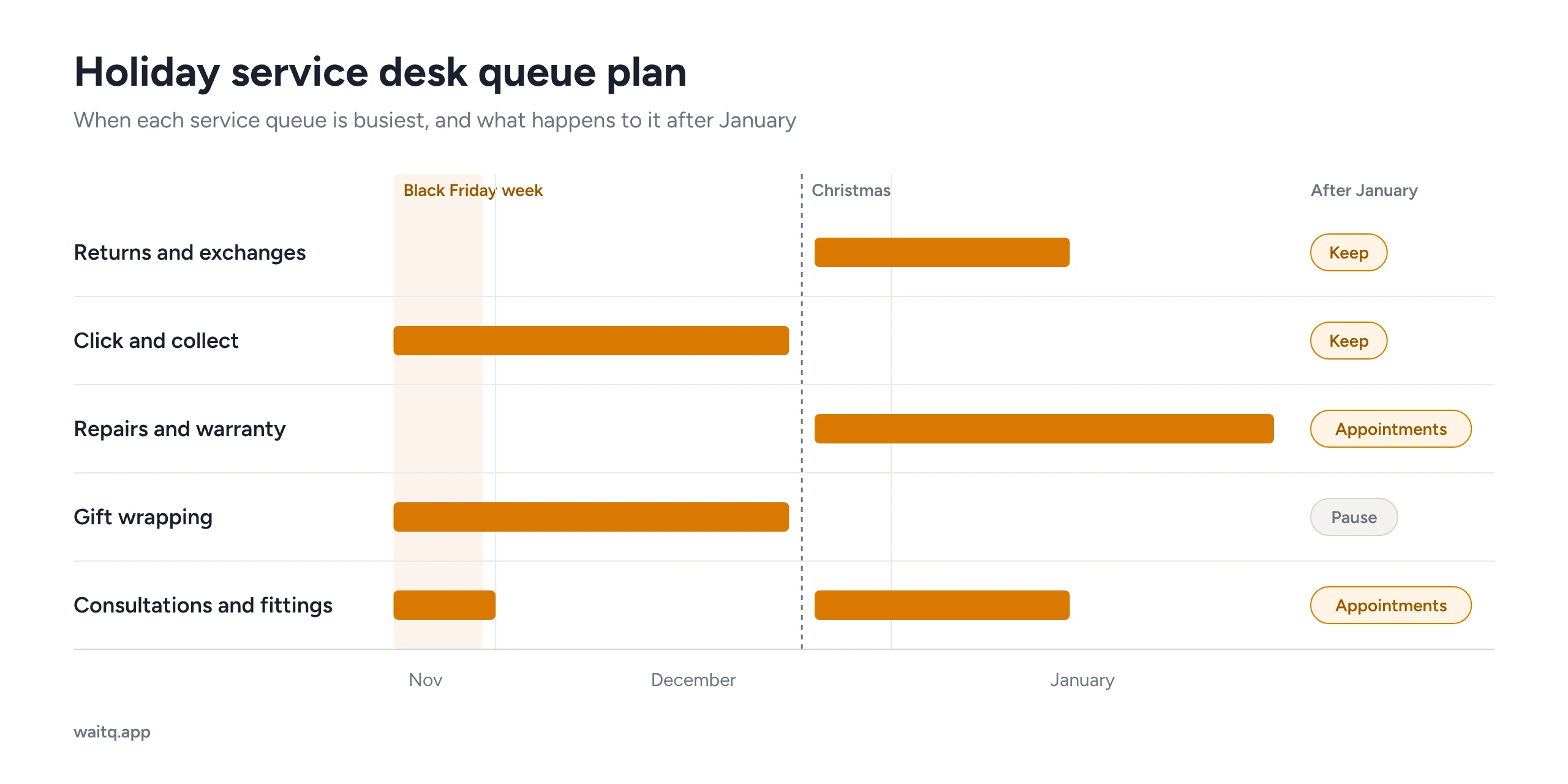 Diagram with holiday service desk queue plan
Why do service desks back up during Black Friday and holiday returns?
Service desks back up because peak-season traffic arrives in bursts, and each service task takes far longer than a checkout scan. In the US, 129.5 million people shopped in store over the Thanksgiving weekend, and 80.3 million of them shopped in store on Black Friday.
Then the returns arrive. US retailers expect 17% of holiday sales to be returned, and plenty of those come back over a counter. Australia shows the same pattern, with 18% of shoppers returning or planning to return a Christmas gift to a store.
Volume is only half of it. The real trouble is the mix of tasks: a pickup takes two minutes, a no-receipt return takes ten, and a phone repair can take half an hour. Put all three in one physical queue and the two-minute jobs end up stuck behind the slow ones, while someone holding a gift receipt stands at the desk instead of browsing.
Which service counters need their own queue?
A counter needs its own queue when its tasks take a very different amount of time from the others, or when it peaks at a different point in the season. In most stores that gives you five service points. The split is the same one used in year-round retail queue management; the holiday version adds seasonal queues and a plan for winding them down in January.
Returns and exchanges
Returns and exchanges need a dedicated queue from 26 December (Boxing Day in the UK and Australia) until the January sales calm down. Exchanges can share it, with a service-type field that tells staff who needs a refund and who just needs a different size.
Ask for two things at check-in: whether the shopper has a receipt or gift receipt, and the item category. With those two answers, staff can get ready before calling the next person.
Click and collect (buy online, pick up in store)
Click and collect needs its own queue because staff have to find each order before they can serve anyone. If the shopper adds an order number at check-in, a colleague can go to the stockroom while the shopper keeps browsing. Keep pickups well away from returns. A pickup is quick, and a return queue would slow it right down.
Repairs, warranty and tech support
Repairs work best as appointments, with a walk-in queue alongside for quick checks. A gifted phone that won't pair and a January warranty claim can be very different jobs. Book the long ones into fixed slots and the walk-in queue stays free for five-minute fixes. Running walk-ins and bookings in one system means staff see both on the same screen.
Gift wrapping
Gift wrapping gets a short-lived queue that runs from Black Friday week to Christmas Eve and then pauses. Demand bunches up on weekends and late evenings, so letting shoppers hold their place and keep shopping makes a real difference. One field is enough: the number of items, which tells staff roughly how long each wrap will take.
Consultations, fittings and personal shopping
Consultations and fittings suit appointments during the busiest weeks, with walk-ins taking any slots that open up. A 30-minute styling session or product demo shouldn't hold up someone with one quick question. Shoppers can book ahead from the store's branded check-in page. The mix looks a lot like a busy Saturday in a barbershop, and the same approach to handling walk-ins around bookings works here.
How do you set up a holiday service desk queue?
Set up a holiday service desk queue in a few steps, starting about four weeks before Black Friday. That leaves time for one test weekend before the peak.
- Split the queues. Create one queue per service point from the table above. Start with two or three, and add another when a counter keeps getting overloaded.
- Keep fields to a minimum. A name, a contact channel and one or two check-in fields are enough. Every extra field slows check-in at exactly the moment the store is busiest.
- Put QR codes where shoppers make decisions. Place QR code check-in signs at the entrance, at each counter and on receipts. Add a self-service kiosk and staff-assisted entry for anyone without a smartphone.
- Choose your notification channels. Systems like WaitQ reach shoppers by push notifications, text message (SMS & WhatsApp) and email.
- Show the queue at the counter. A public display on a TV or tablet shows who's next, so staff field fewer "how long?" questions.
- Move long tasks to appointments. Open repair and consultation slots before peak days, so long jobs don't pile up over Black Friday weekend.
- Brief the team. Agree how staff call, recall and mark walk-aways, and how they handle priority cases such as accessibility needs or a click and collect order that's already running late.
What changes between Black Friday week and post-Christmas returns?
Black Friday week is mostly pickups, gift wrapping and consultations. After Christmas it's mostly returns, exchanges and repairs. Keep the same system running through both phases and change which queues are open and who staffs them.
| Black Friday week to Christmas Eve | 26 December to mid-January | |
| Busiest queues | Click and collect, gift wrapping, consultations | Returns and exchanges, repairs and warranty |
| Queues to pause | None | Gift wrapping |
| Queues to open | Gift wrapping | Exchanges as a service type, extra returns staff |
| Fields to add | Order number on pickups | Receipt or gift receipt on returns |
| Staffing focus | Stockroom runners for pickups | A second returns position at peak hours |
What does WaitQ do at the service desk, and what doesn't it do?
WaitQ is a cloud platform for walk-in queues, bookings and guest lists, and in retail it manages the waiting at service counters. Shoppers join a digital queue for the service they need from the branded check-in page, a QR code or a kiosk. They can see their live position and get a notification when the counter is ready. Staff see every service queue and booking in one browser-based view on a phone, tablet or desktop.
WaitQ doesn't process sales, refunds or exchanges, and it doesn't look up orders in your OMS. Staff type order numbers into a custom field, and the transaction still happens in your POS. Test that handoff on a quiet day before the peak.
Every plan includes unlimited visits, queues and bookings, so a record Saturday won't push the store onto a higher usage tier.
Get your service desk ready for the holiday peak
Set up returns, pickup and repair queues in minutes. Shoppers join by QR code, keep browsing and get a notification when it's their turn.
What should the "your turn" message say?
A "your turn" message should name the counter, say where it is and give a time to arrive. Keep it under 160 characters so it fits in a single SMS:
- Returns: "Hi [name], the returns desk is ready for you. Please come to counter 2, next to the fitting rooms, within 5 minutes."
- Click and collect: "Hi [name], your order [order number] is ready. Collect it at the pickup counter by the main entrance."
- Repairs: "Hi [name], a technician is ready to look at your device. Please come to the repairs desk on the first floor." Use the same structure for other counters, or adapt one of these SMS queue templates.
Which queue metrics should you review after the peak?
After the peak, review five metrics for each queue: average wait, walk-aways, customers served per hour, peak hours and appointment no-shows. Comparing them counter by counter shows which service points were understaffed and which queues could be merged. WaitQ analytics breaks each one down by queue and location. If this is your first look at queue analytics, start with average wait and walk-aways.
Write down the peak hours for each counter. Next year's staffing plan and Black Friday rota should start from those numbers.
Which holiday queues should you keep after the peak?
Keep a queue if it still gets steady weekly traffic or handles tasks much longer than the rest. Merge everything else into one service desk queue with a service-type field. Returns carry on all year: US retailers expect 15.8% of all annual sales to be returned, so most stores need a returns queue in some form well past January.
| Queue | After January | Why |
| Returns and exchanges | Keep, or merge if volume drops | Returns arrive all year |
| Click and collect | Keep | Online orders keep coming in |
| Repairs and warranty | Switch to appointments, with walk-ins as a fallback | Long jobs are easier to plan as bookings |
| Gift wrapping | Pause | Seasonal only; keep the setup for next year |
| Consultations and fittings | Keep as appointments if demand holds | Long sessions still need protected time |
Leave the QR signs, check-in page, counter display and staff calling routine where they are. A shopper who joined a queue from their phone in December will look for the same option in March. Move notifications back to push and email, and save SMS and WhatsApp credits for the moments that need them.
Keep the setup, message templates and peak-hour data. Every WaitQ plan includes unlimited queues, so a paused gift-wrapping queue costs nothing to keep and is ready to switch back on next November.
Holiday service desk checklist
Four weeks before Black Friday
- Create one queue per service point and set the check-in fields
- Print QR signs for the entrance, counters and receipts
- Set up the kiosk and the counter display
- Open appointment slots for repairs and consultations
- Run one test weekend and fix whatever slowed staff down
Black Friday week
- Open the gift wrapping queue
- Add stockroom runners for click and collect
- You'll want to check wait analytics daily and move staff to the busiest queue
Christmas Eve
- Pause gift wrapping
- Add a receipt or gift receipt field to the returns queue
- Confirm returns staffing from 26 December
26 December to mid-January
- Run returns and exchanges as the priority queue
- Keep repairs on appointments, with a walk-in queue for quick checks
- Review walk-aways weekly
End of January
- Decide which queues to keep, merge or pause
- Export peak-hour data for next year's plan
- Switch notifications back to push and email
Is a digital queue worth it for the holiday service desk?
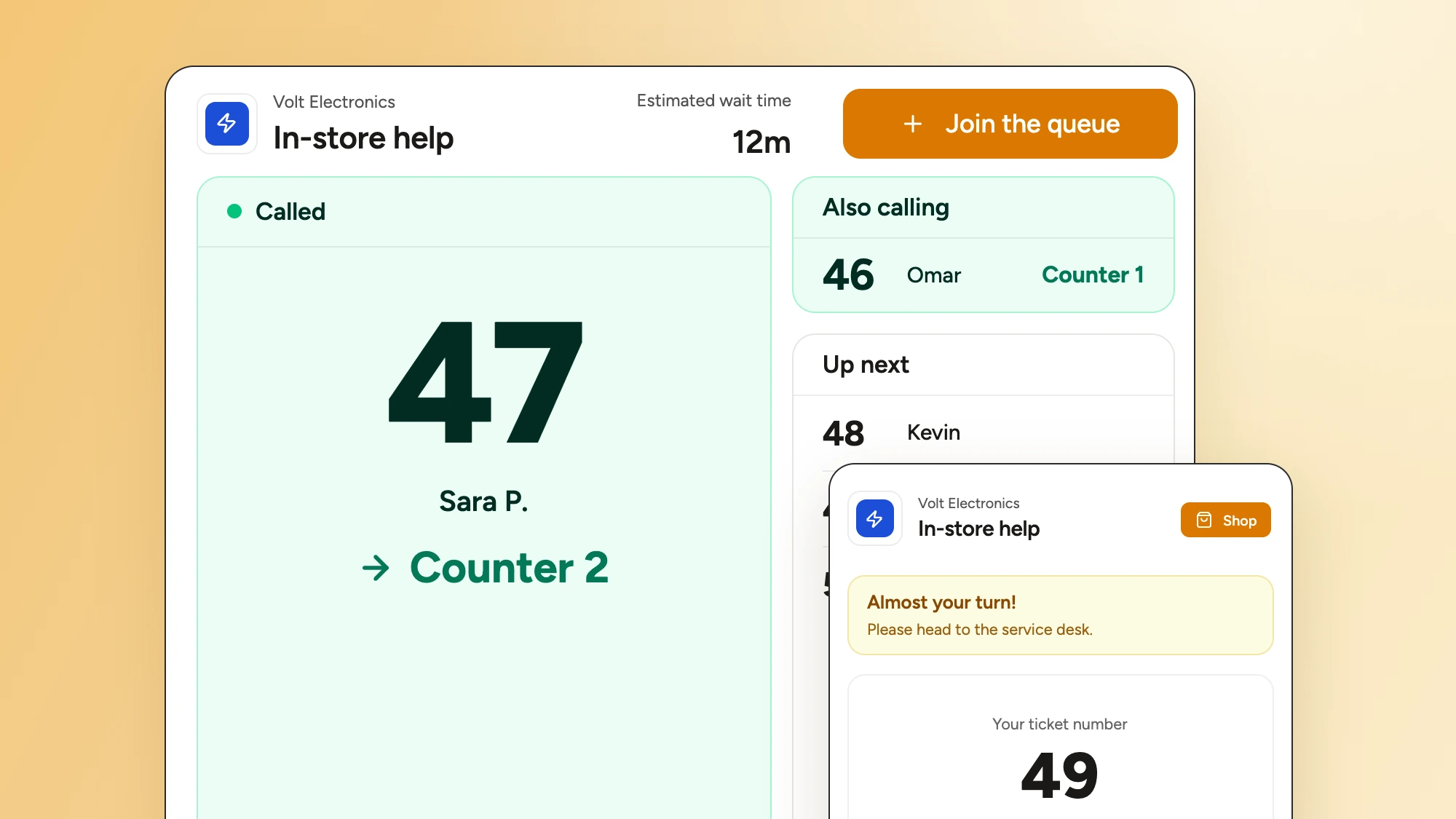
A digital queue takes the waiting away from the counter. It doesn't add capacity: how many shoppers you serve per hour still comes down to staff numbers and task length. But splitting queues by task, keeping check-in short and moving long jobs to appointments get more out of the capacity you already have. Whether that pays off depends on how many shoppers your service desk loses at peak, and the setup is easy to repeat next November.
WaitQ covers the queue and booking layer for returns, pickups, repairs and consultations, and runs alongside your POS and OMS. For everyone else, plans start from $27 a month with unlimited customer visits on every plan.
Frequently Asked Questions
How do you manage holiday returns at the service desk?
Give returns and exchanges their own virtual queue from 26 December to mid-January. Shoppers join by QR code or kiosk, keep browsing and get a notification when the desk is ready, and staff can see who has a receipt or gift receipt before calling them.
Should click and collect have its own queue?
Yes. A pickup takes a couple of minutes and a return can take ten, so a shared queue makes quick pickups wait behind slow returns. Asking for the order number at check-in lets staff fetch the parcel while the shopper keeps browsing.
When should a store set up its holiday service desk queues?
About four weeks before Black Friday. That leaves time for one test weekend to fix anything that slows staff down before the peak.
Does a virtual queue process returns or refunds?
No. A virtual queue manages the wait at the counter. Refunds, exchanges and order lookups still happen in your POS and order management system.
What should a store do with its holiday queues after January?
Keep the queues that still get steady weekly traffic, such as returns and click and collect, and merge the rest into one service desk queue with a service-type field. Pause gift wrapping and keep its setup for next November.
